> For the complete documentation index, see [llms.txt](https://docs.onedaybundle.com/onedaybundle/llms.txt). Markdown versions of documentation pages are available by appending `.md` to page URLs; this page is available as [Markdown](https://docs.onedaybundle.com/onedaybundle/registraciya/upravlenie_prodavcami.md).

# Управление продавцами

### Выбор текущего продавца

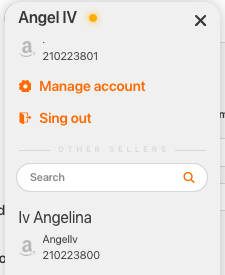
После добавления всех продавцов полный список отобразится в выпадающем окне вверху страницы над списком разделов

<figure><img src="/files/cIdqLX7bHKgJBui6ITBM" alt=""><figcaption></figcaption></figure>

Текущий активный продавец будет выделен оранжевой точкой. Если вы хотите переключить продавца, кликните по соответствующем имени в списке. Если список продавцов велик, можете воспользоваться меню "Поиск" и найти продавца по названию или email.

### Редактирование личных данных пользователя и продавца

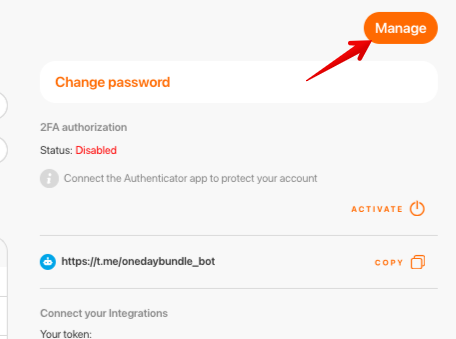
В меню Settings можно изменить как общие данные аккаунта, так и данные отдельного продавца. Для изменения общих данных нажмите на кнопку **Manage** в правом верхнем углу экрана. &#x20;

<figure><img src="/files/UpVNJpHJcrYQRWGYllUj" alt=""><figcaption></figcaption></figure>

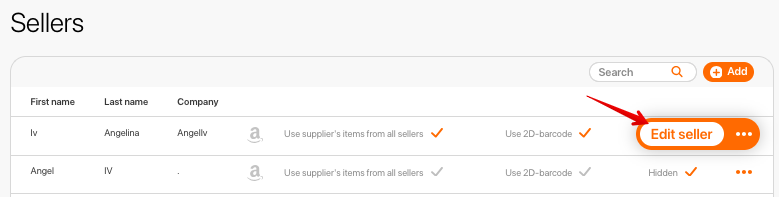
Для редактирования данных продавца нажмите на кнопку **Edit seller.**

<figure><img src="/files/DgzBMo8zJjKNQakEwcJ1" alt=""><figcaption></figcaption></figure>

После внесения всех необходимых изменений, нажмите на кнопку **Save**.&#x20;

### 2FA authorization

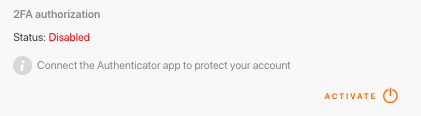
Вы можете включить авторизацию 2FA, чтобы защитить свою учетную запись. Чтобы активировать эту опцию, нажмите кнопку «**Activate**».

<figure><img src="/files/uo2SQYIpyKooFt3qJz3H" alt=""><figcaption></figcaption></figure>

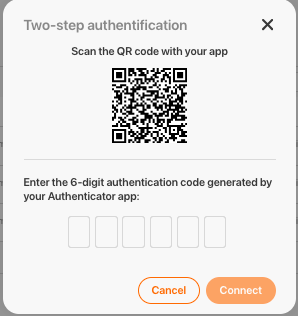
Для активации необходимо скачать приложение Authenticator, просканировать предложенный QR код и ввести полученные цифры.

<figure><img src="/files/o5DhhXH6bhQdA0ba6GMo" alt=""><figcaption></figcaption></figure>

### Как изменить пароль?

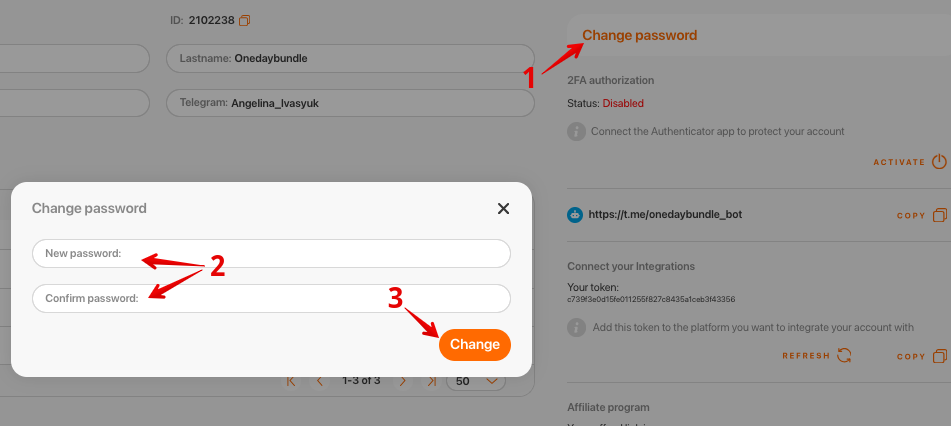
Если вы хотите изменить пароль, вам нужно нажать кнопку «**Change Password**» (**1**). Введите новый пароль, повторите его (**2**) и нажмите кнопку «**Change**» (3).

<figure><img src="/files/sL34gM33cFMs942d67h2" alt=""><figcaption></figcaption></figure>

{% embed url="<https://www.youtube.com/watch?t=3s&v=WTYpPjfz20Q>" %}


---

# Agent Instructions
This documentation is published with GitBook. GitBook is the documentation platform designed so that both humans and AI agents can read, navigate, and reason over technical content effectively. Learn more at gitbook.com.

## Querying This Documentation
If you need additional information that is not directly available in this page, you can query the documentation dynamically by asking a question.

Perform an HTTP GET request on the current page URL with the `ask` query parameter, and the optional `goal` query parameter:

```
GET https://docs.onedaybundle.com/onedaybundle/registraciya/upravlenie_prodavcami.md?ask=<question>&goal=<endgoal>
```

`ask` is the immediate question: it should be specific, self-contained, and written in natural language.
`goal` is optional and describes the broader end goal you are ultimately trying to accomplish on behalf of the user. GitBook uses it to tailor the answer towards what is most useful for that goal.

The response will contain a direct answer to the question and relevant excerpts and sources from the documentation.

Use this mechanism when the answer is not explicitly present in the current page, you need clarification or additional context, or you want to retrieve related documentation sections.